
TL;DR I’m releasing a beta version of Hypha, an experimental CLI tool for Haskell development which can be useful to explore your project dependencies, read documentation offline without the need of generating Haddock files, and use LLM harnesses and tools without hammering Hackage or Hoogle. Think of Hypha as an offline-first, enhanced version of your Cabal store.
Albeit developed making extensive use of generative AI, Hypha itself can be used without any LLM: the data is yours, everything it caches is held locally, and it does not make calls to external AI services. Hypha can be used offline, and despite being designed for use together with an AI harness, it doesn’t require one.
In this blog post I’ll discuss the rationale behind this tool, what it does and how it does it.
An important disclaimer: Hypha was born as an experiment in AI-assisted development and as such it has been developed via heavy usage of LLMs, using a mix of proprietary state-of-the-art models but also open weights ones, to assess capabilities, strengths and weaknesses of each of them. In a sense, I have been mostly wearing the “Architect Hat” for Hypha (see my talk from the Haskell Foundation AI workshop). Hypha is currently in an early-beta stage, and while I have happily been using it for a few months now, it’s probably not free from bugs or inconsistencies. I’d be delighted to receive feedback and/or bug reports on the Hypha repo.
This post is deliberately written using a personal style as it reflects my own choices, both in style and form. For the readers who might desire to know, this post is 100% human-written!
The problem(s)
LLM interactions are mostly stateless and not cache friendly
Generative AI is a particularly divisive topic these days, with some companies and programming language communities embracing it, while others reject everything that an LLM has ever produced. Independently of which side you might be, the advent of AI harnesses like Claude Code, OpenCode or Pi created a lot of stress for websites, including Hackage.
Every time somebody asks an LLM “What’s the signature of mapConcurrentlyBounded?”1 or “Can you find me a
generalised version of this function?” there are two possibilities: either this information is already
cached in the AI harness context, and can be served straight away (saving time and tokens)
or it’s not. If there is a cache miss, the AI may:
grepthrough the codebase for existing uses of that function, try to reconstruct the type signature from usage and return a first approximation of an answer;- otherwise, try to find the exact source code for the requested function.
We might be in luck, with the source code already resident on our computer; that would be the case at least in a few scenarios:
- The package has been specified in your
cabal.projectas asource-repository-package(and thus Cabal checked out the relevant Git repo somewhere in the project’sdist-newstyle); - The package has been downloaded from Hackage before, and it’s available compressed as a tarball inside Cabal’s cache;
- If you are a Nix user, the package would be somewhere in your Nix store.
In the scenarios above, the LLM might provide you with the right answer, but it’s a fairly non-deterministic process, because it varies according to the quality of the LLM one is using; weaker models might ignore the fact you want the signature for a specific version of a specific package, and just blindly give you any signature matching any version of the package. Similarly, if you are using an AI harness from within a sandbox (like you should!) the harness might not be able to find the cached information at all if the sandbox is blocking the cache path.
In unlucky cases, if we try to ask an LLM for the source code or
the precise signature of mapConcurrentlyBounded, the AI could end up downloading the tarball of
the async package from Hackage, unpacking it locally in a temporary directory, grepping it,
finding the definition and returning it to the user.
This is a lot of wasted effort, because if we ask the same question again in a separate session,
chances are the temporary file has been pruned or simply the LLM has no memory of the past interaction,
so the tarball ends up being downloaded afresh, hitting Hackage again.
The problem is made worse by the fact that sometimes (and I have been guilty of this in the past, as well) it’s so damn tempting to just point the AI harness to Hackage and then ask generic questions, and that creates unnecessary stress on a critical piece of infrastructure for the Haskell community.
Which version of async, anyway?
Another problem that we face when using LLMs to ask questions about our source code and its dependencies
is that it might not be clear from the context which version of async we mean: if we paste in a prompt
the Hackage link to async , we are implicitly assuming that we mean to explore the most recent version,
which might not be true in the constraints of our project: maybe we are forced to use a specific subset of
async versions which didn’t even have mapConcurrentlyBounded available!
What about token consumption?
As you can imagine, doing this kind of “stateless” interaction is not just wasteful in terms of HTTP traffic, but also in terms of token consumption; the LLM has to download the tarball, unpack it, understand its structure (at the very least grep for the requested information, and then read chunks of the source file to extract what’s needed), and there is very little room for caching this information given everything is done in an ad-hoc fashion.
What’s worse is that all this precious knowledge is sometimes lost the minute we wrap up the session (or our temporary directory is pruned): once we have done the hard work we cannot get more out of it (for example exploring reverse dependencies for a package, or figuring out when a function got removed between versions, or how a function is implemented internally and why).
What if a package is not on Hackage?
As said above, surprisingly that’s the easiest case, as the information would
be stored in the dist-newstyle directory. But this relies on the LLM figuring
out that the requested package is available as a source-repository-package in
our cabal.project, which might not be immediately obvious and it might result
in a few wasted calls to Hackage (bad) or web searches to figure things out.
Modern LLMs are getting quite good at avoiding this, but not
everybody is running expensive state-of-the-art models.
Given all the above, what do we do, then?
A quick tour of Hypha
Finally, we are ready to take a quick tour of Hypha;
hopefully at the end of this tour you will have enough information to let you decide if you want to
use it or not (and I hope you will!). If you’d like to try it yourself, see the
installation instructions on the docs site
and run cabal build all --dry-run to generate the Cabal build plan for your project.
Let’s start with a concrete example. Suppose we are working on a project, and we have a type like this:
data LogEntry
  = LogEntry
  { _le_payload   :: String
  , _le_timestamp :: UTCTime
  } deriving (Show, Eq, Ord)
We know our basic Haskell and we know sort exists, but here we want something a bit different:
we don’t want to sort based on the Ord instance, but rather we would like to sort log entries on their
timestamp, so ideally we would like to have a variant of sort which accepts a custom function to sort
over a field.
We vaguely remember such function exists somewhere in base, but we don’t remember its name.
Of course we could go on Hackage, find the definition of sort and look for similarly-named functions
within that module. But that would make the tutorial much more boring! :-) Jokes aside, this is not about what
you, a human, would do, it’s about creating the most efficient and easy-to-use path for an AI harness.
hypha lookup
What we can do instead is to ask hypha about the existence of such function:
> hypha lookup 'Ord b => (a -> b) -> [a] -> [a]'

actions:
  base/Data.List/sortOn: hypha symbol base/Data.List/sortOn
  base/GHC.Exts/sortWith: hypha symbol base/GHC.Exts/sortWith
  base/GHC.OldList/sortOn: hypha symbol base/GHC.OldList/sortOn
  containers/Data.Containers.ListUtils/nubOrdOn: hypha symbol containers/Data.Containers.ListUtils/nubOrdOn
result:
  providers:
    - mod: Data.List
      name: sortOn
      pkg: base
      sig: "Ord b => (a -> b) -> [a] -> [a]"
      tier: local-hoogle
    - mod: GHC.Exts
      name: sortWith
      pkg: base
      sig: "Ord b => (a -> b) -> [a] -> [a]"
      tier: local-hoogle
    - mod: GHC.OldList
      name: sortOn
      pkg: base
      sig: "Ord b => (a -> b) -> [a] -> [a]"
      tier: local-hoogle
    - mod: Data.Containers.ListUtils
      name: nubOrdOn
      pkg: containers
      sig: "Ord b => (a -> b) -> [a] -> [a]"
      tier: local-hoogle
  query: "Ord b => (a -> b) -> [a] -> [a]"
This is lookup’s main purpose: giving you a concrete entry point for discovering functions you might
have already available transitively in your build plan but you don’t know where they are or how they are
called. Internally, lookup queries Hoogle (offline first, remote once only on a cache miss), and the
result of lookup is a list of candidates all satisfying the requested type signature.
What makes lookup useful is that it is not limited to just locally-cached packages in your project.
This means you or an LLM can use lookup as the initial gateway to access relevant information, saving
the time of looking things up in two different data sources, while protecting the integrity of the
infrastructure by trying to be as cache-friendly as possible.
hypha symbol
Lo and behold, we have now found that sortOn exists and it seems to be the function we are looking for.
The next step would be to get a bit more information about it, which we can do via the symbol command:
> hypha symbol base/Data.List/sortOn

actions:
  module_index: hypha module base/Data.List
  package_info: hypha package base
  view_source: hypha source base/Data.List/sortOn
result:
  defined_in:
    component: base
    module: Data.OldList
  haddock_raw: " Sort a list by comparing the results of a key function applied to each\n element.  @sortOn f@ is equivalent to @sortBy (comparing f)@, but has the\n performance advantage of only evaluating @f@ once for each element in the\n input list.  This is called the decorate-sort-undecorate paradigm, or\n Schwartzian transform.\n\n Elements are arranged from lowest to highest, keeping duplicates in\n the order they appeared in the input.\n\n >>> sortOn fst [(2, \"world\"), (4, \"!\"), (1, \"Hello\")]\n [(1,\"Hello\"),(2,\"world\"),(4,\"!\")]\n\n @since 4.8.0.0"
  kind: function
  module: Data.List
  name: sortOn
  package: base
  signature: "sortOn :: Ord b => (a -> b) -> [a] -> [a]"
  version: '4.16.4.0'
As you can see, the output includes two major “blocks”:
- An
actionsblock, which are like breadcrumbs to suggest to an LLM where to go next (as we will see later); - The
resultblock, which includes useful information likehaddock_raw, which allows answering some easy questions immediately (think if the question was “what doessortOndo?”).
If desired, it’s possible to select only a subset of fields from the result block via the --select option:
> hypha symbol base/Data.List/sortOn --select "version, haddock_raw"

actions:
  module_index: hypha module base/Data.List
  package_info: hypha package base
  view_source: hypha source base/Data.List/sortOn
result:
  haddock_raw: " Sort a list by comparing the results of a key function applied to each\n element.  @'sortOn' f@ is equivalent to @'sortBy' ('comparing' f)@, but has the\n performance advantage of only evaluating @f@ once for each element in the\n input list.  This is called the decorate-sort-undecorate paradigm, or\n <https://en.wikipedia.org/wiki/Schwartzian_transform Schwartzian transform>.\n\n Elements are arranged from lowest to highest, keeping duplicates in\n the order they appeared in the input.\n\n The argument must be finite.\n\n ==== __Examples__\n\n >>> sortOn fst [(2, \"world\"), (4, \"!\"), (1, \"Hello\")]\n [(1,\"Hello\"),(2,\"world\"),(4,\"!\")]\n\n >>> sortOn length [\"jim\", \"creed\", \"pam\", \"michael\", \"dwight\", \"kevin\"]\n [\"jim\",\"pam\",\"creed\",\"kevin\",\"dwight\",\"michael\"]\n\n ==== __Performance notes__\n\n This function minimises the projections performed, by materialising\n the projections in an intermediate list.\n\n For trivial projections, you should prefer using 'sortBy' with\n 'comparing', for example:\n\n >>> sortBy (comparing fst) [(3, 1), (2, 2), (1, 3)]\n [(1,3),(2,2),(3,1)]\n\n Or, for the exact same API as 'sortOn', you can use `sortBy . comparing`:\n\n >>> (sortBy . comparing) fst [(3, 1), (2, 2), (1, 3)]\n [(1,3),(2,2),(3,1)]\n\n @since base-4.8.0.0"
  version: '4.20.2.0'
hypha source
Following the same “stream of consciousness” that an LLM would also follow, the next step
(depending on the original query, of course) would be to take a look at the source code for sortOn,
which, as you might guess, is available via the source command:
> hypha source base/Data.List/sortOn

result:
  line: 1819
  module: GHC.Internal.Data.OldList
  package: ghc-internal
  path: /home/alfredo/.cache/hypha/source/ghc-internal-9.1003.0/src/GHC/Internal/Data/OldList.hs
  snippet: |
    -- the projections in an intermediate list.
    --
    -- For trivial projections, you should prefer using 'sortBy' with
    -- 'comparing', for example:
    --
    -- >>> sortBy (comparing fst) [(3, 1), (2, 2), (1, 3)]
    -- [(1,3),(2,2),(3,1)]
    --
    -- Or, for the exact same API as 'sortOn', you can use `sortBy . comparing`:
    --
    -- >>> (sortBy . comparing) fst [(3, 1), (2, 2), (1, 3)]
    -- [(1,3),(2,2),(3,1)]
    --
    -- @since base-4.8.0.0
    sortOn :: Ord b => (a -> b) -> [a] -> [a]
    sortOn f =
      map snd . sortBy (comparing fst) . map (\x -> let y = f x in y `seq` (y, x))

    -- | Construct a list from a single element.
    --
    -- ==== __Examples__
    --
    -- >>> singleton True
    -- [True]
    --
    -- >>> singleton [1, 2, 3]
    --[[1,2,3]]
    --
    -- >>> singleton 'c'
    -- "c"
    --
  symbol: sortOn
From here we can just read the implementation, query other ancillary functions etc.
hypha module
More often than not, discovering one function makes us curious about its neighbours: if Data.List
has sortOn, what else is in there that we have been re-implementing by hand? LLMs have a tendency to
hand-roll a lot of things, so this is a nice arrow to have in our quiver. We can use the module
command for that:
> hypha module base/Data.List

actions:
  "++": "hypha symbol base/Data.List/++"
  List: hypha symbol base/Data.List/List
  head: hypha symbol base/Data.List/head
  last: hypha symbol base/Data.List/last
  module_index: hypha module base/Data.List
  package_info: hypha package base
  tail: hypha symbol base/Data.List/tail
result:
  exports:
    - name: List
    - name: "++"
    - name: head
    - name: last
    - name: tail
    - name: init
    - name: uncons
    - name: unsnoc
    - name: singleton
    - name: null
    - name: length
    - name: map
    - name: reverse
    - name: intersperse
    - name: intercalate
    - name: transpose
    - name: subsequences
    - name: permutations
    - name: foldl
    - name: "foldl'"
    - name: foldl1
    # ...
That by default gives us the version of base and Data.List which is specific to our build plan,
but we can also ask for a specific version using this alternative syntax:
hypha module base-4.10.0.0/Data.ListThis is especially nice as it can be used by an LLM to easily diff the resulting YAML to spot missing functions, deprecations, removals, etc.
hypha package
In the same vein it’s possible to have a holistic view on a whole package using the package command,
which has the effect you might imagine:
> hypha package thread-supervisor-0.2.0.0

actions:
  Control.Concurrent.Supervisor: hypha module thread-supervisor/Control.Concurrent.Supervisor
  Control.Concurrent.SupervisorInternal: hypha module thread-supervisor/Control.Concurrent.SupervisorInternal
  Data.DelayedQueue: hypha module thread-supervisor/Data.DelayedQueue
  module_index_hint: "hypha module thread-supervisor/<Module>"
  reverse_deps: hypha deps thread-supervisor --reverse
  version_history: hypha versions thread-supervisor
result:
  exposed_modules:
    - Control.Concurrent.Supervisor
    - Control.Concurrent.SupervisorInternal
    - Data.DelayedQueue
  is_local: false
  name: thread-supervisor
  origin:
    kind: hackage
  version: '0.2.0.0'
Everything we have seen so far is also available as a Claude plugin
which can be installed to use hypha directly inside a Claude Code session. For example, we might want to ask:
/hypha:hypha-lookup mapConcurrentlyBoundedAnd this is what you would see:
● Bash(cabal run -v0 hypha -- lookup mapConcurrentlyBounded 2>&1 | head -60)
  ⎿  actions:
       async/Control.Concurrent.Stream/mapConcurrentlyBounded: hypha symbol async/Control.Concurrent.Stream/mapConcurrentlyBounded
     result:
       providers:
         - mod: Control.Concurrent.Stream
           name: mapConcurrentlyBounded
           pkg: async
           sig: "mapConcurrentlyBounded :: Int -- ^ Maximum concurrency -> (a -> IO b) -- ^ Function to map over the input values -> [a] -- ^ List of input values -> IO [b] -- ^ List of output values"
           tier: cache
       query: mapConcurrentlyBounded

● mapConcurrentlyBounded found, tier cache:

  mapConcurrentlyBounded
    :: Int              -- ^ Maximum concurrency
    -> (a -> IO b)      -- ^ Function to map over the input values
    -> [a]              -- ^ List of input values
    -> IO [b]           -- ^ List of output values

  Package async, module Control.Concurrent.Stream. No haddock body beyond arg comments.
Serving interactive documentation
One of the side goals of the project was to fix an old pet peeve of mine, by providing an easily-accessible,
offline-first UI to browse and navigate Haskell documentation, at least of those packages I use daily.
Back when I was on Mac OS for development,
I used Dash, which supported GHC Haskell (essentially, base) documentation alongside the ability to
download so-called “docsets” for Haskell packages.
Unfortunately I couldn’t find an equally-satisfying alternative in Linux land; the closest I’m aware of is Zeal but, at the time of writing this blog post, it didn’t support documentation from Hackage. Even when I was using Dash, though, I wasn’t completely satisfied with it either, mostly because if you decided to download a docset for a package, the program would silently download revisions for each new version out there, making it difficult to do precise querying.
hypha server
For all these reasons, given the fact the hard work was already done for the AIs, I have decided to also bolt on a server which can be run locally in order to browse the documentation. You start it with a single command:
hypha server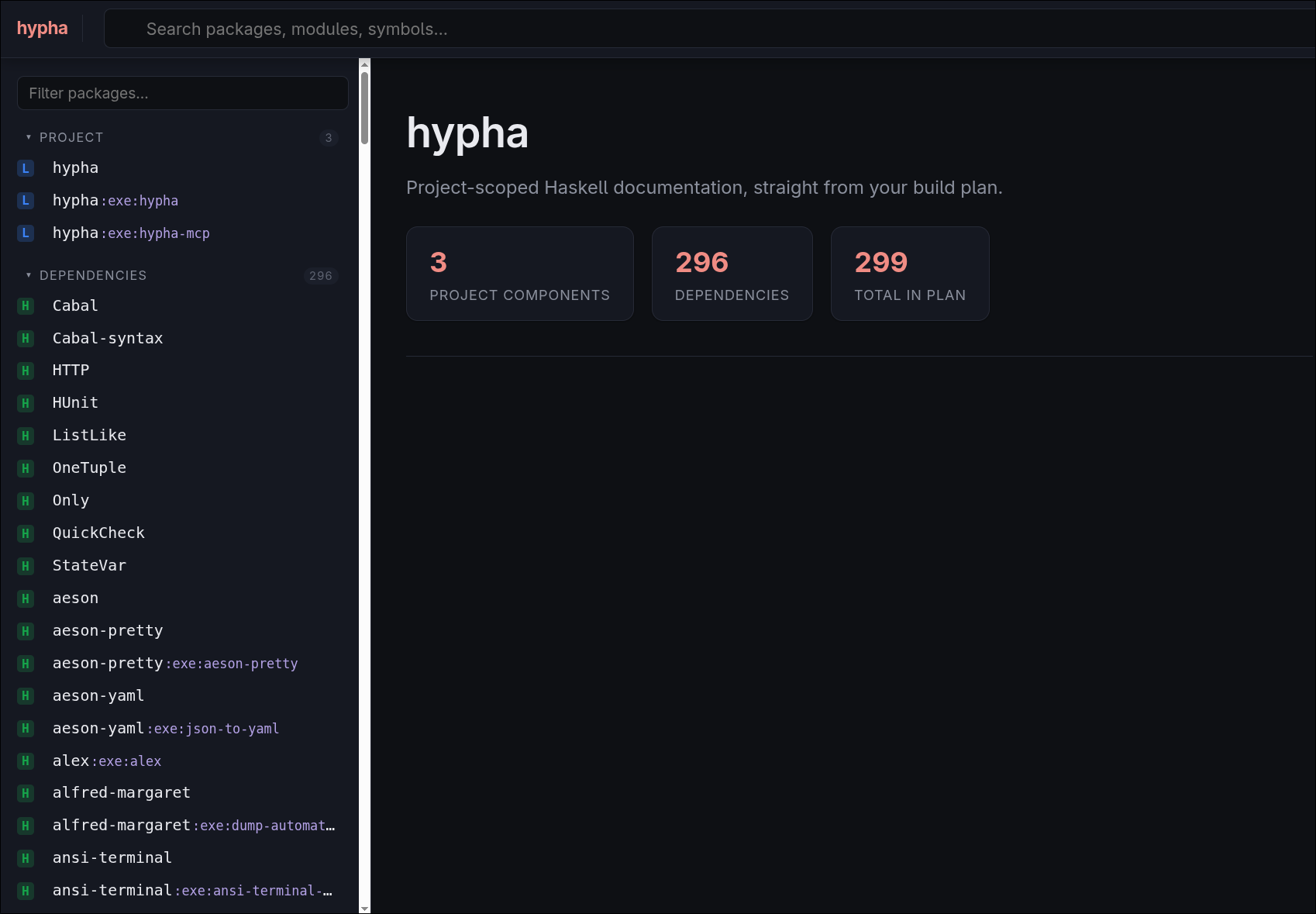
The homepage gives you an immediate sense of what Hypha knows about your project. The sidebar is split into two groups:
- Project, for the packages that make up your own codebase, and
- Dependencies, for everything else in the build plan.
Notice that the Project group is not limited to libraries: in the
screenshot you can see that Hypha tracks every component of the project, including its executables
(hypha:exe:hypha and hypha:exe:hypha-mcp), and the same goes for sub-libraries. This works because
Hypha does not stop at plan.json: for every unit in the plan whose source directory is known, it also
reads the corresponding .cabal stanza, so it knows exactly which components exist and which modules
each one exposes.
The “docset” hypha server exposes is not any collection of packages,
but it’s an exact snapshot, version-by-version of all your project’s dependencies. This eliminated for
me the all-too-frequent pattern of checking in the build plan which version of a package I was using, taking note
of its version, searching for the package on Hackage, selecting the required version and finally browsing
through the documentation.
Browsing the documentation
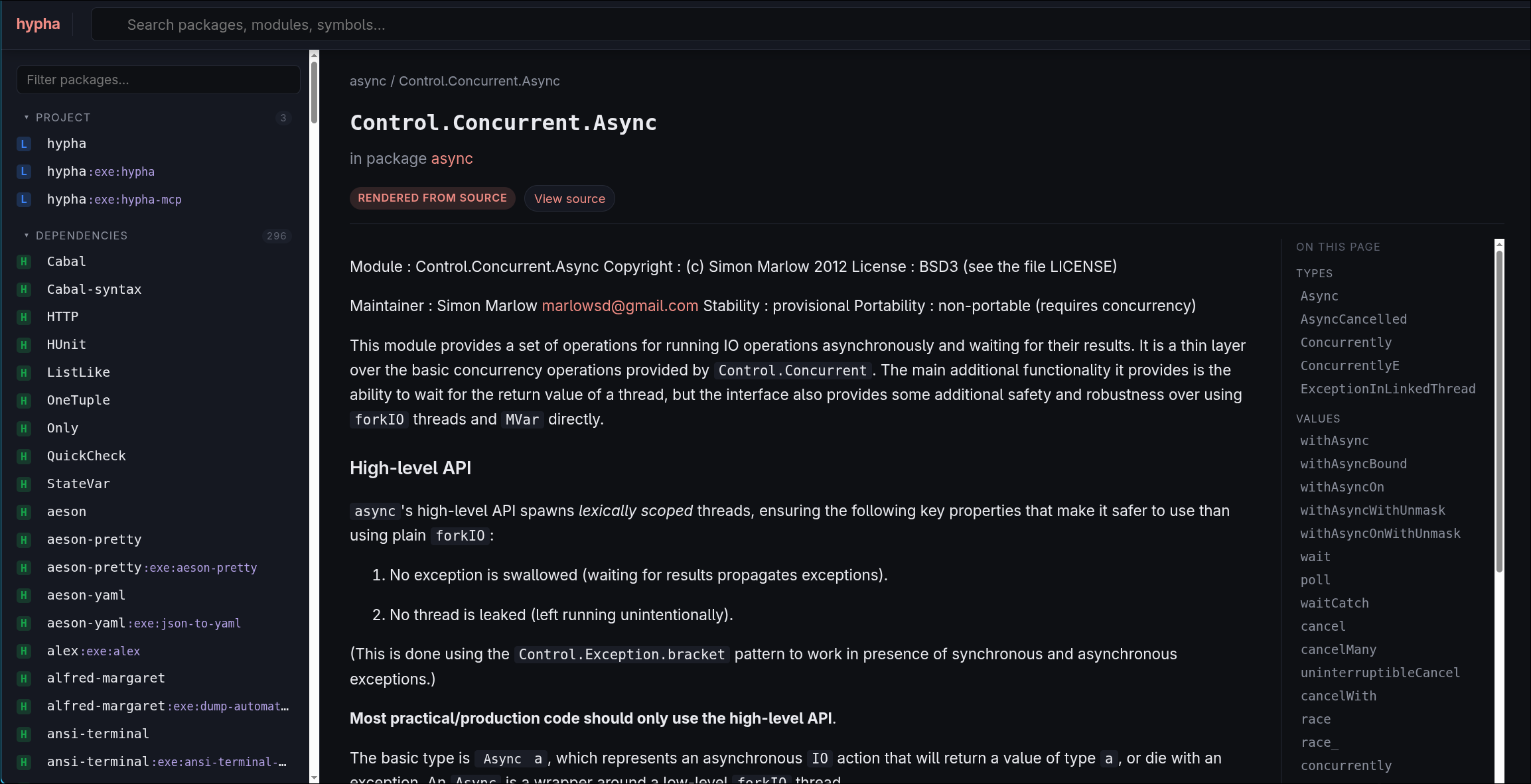
Clicking on a module opens its documentation page. The header shows the usual metadata, the module description is rendered in full, and on the right hand side you get a panel listing the symbols the module exports, grouped by kind, a bit like the module pages on Hackage, or like Dash. Every entry in the panel is interactive: clicking it brings up a symbol card with the signature and its Haddock documentation, and from there you can jump to the source:
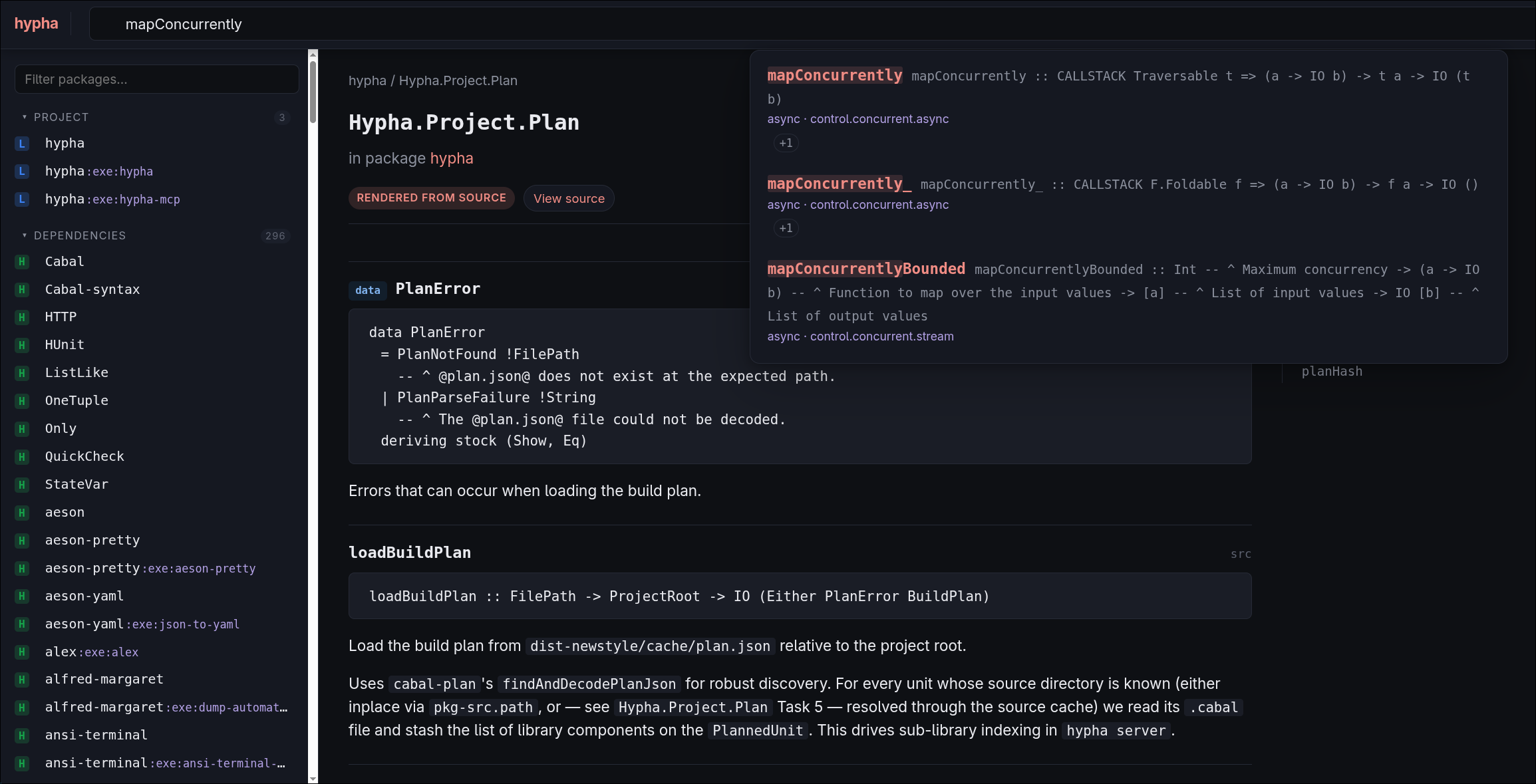
The top search bar allows you to do fuzzy queries for packages and symbols:
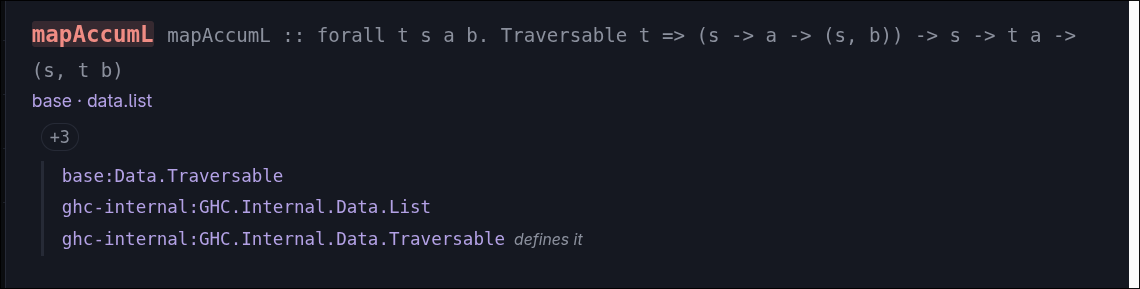
If the same package re-exports the same symbol in multiple places, that is
tracked by a little +N on the bottom of the search result (in the screenshot
that’s the case for mapAccumL, and the exports are explicitly reported):
Every package in the plan is tagged with its provenance, i.e. where it came from, represented in the sidebar by a small single-letter badge:
Hfor Hackage,Dfor a GHC distribution/boot library,Lfor a local package,Sfor a source-repository-package.
For packages that are published on Hackage the page also offers a “view on Hackage” link, so opening the latter is typically one click away:
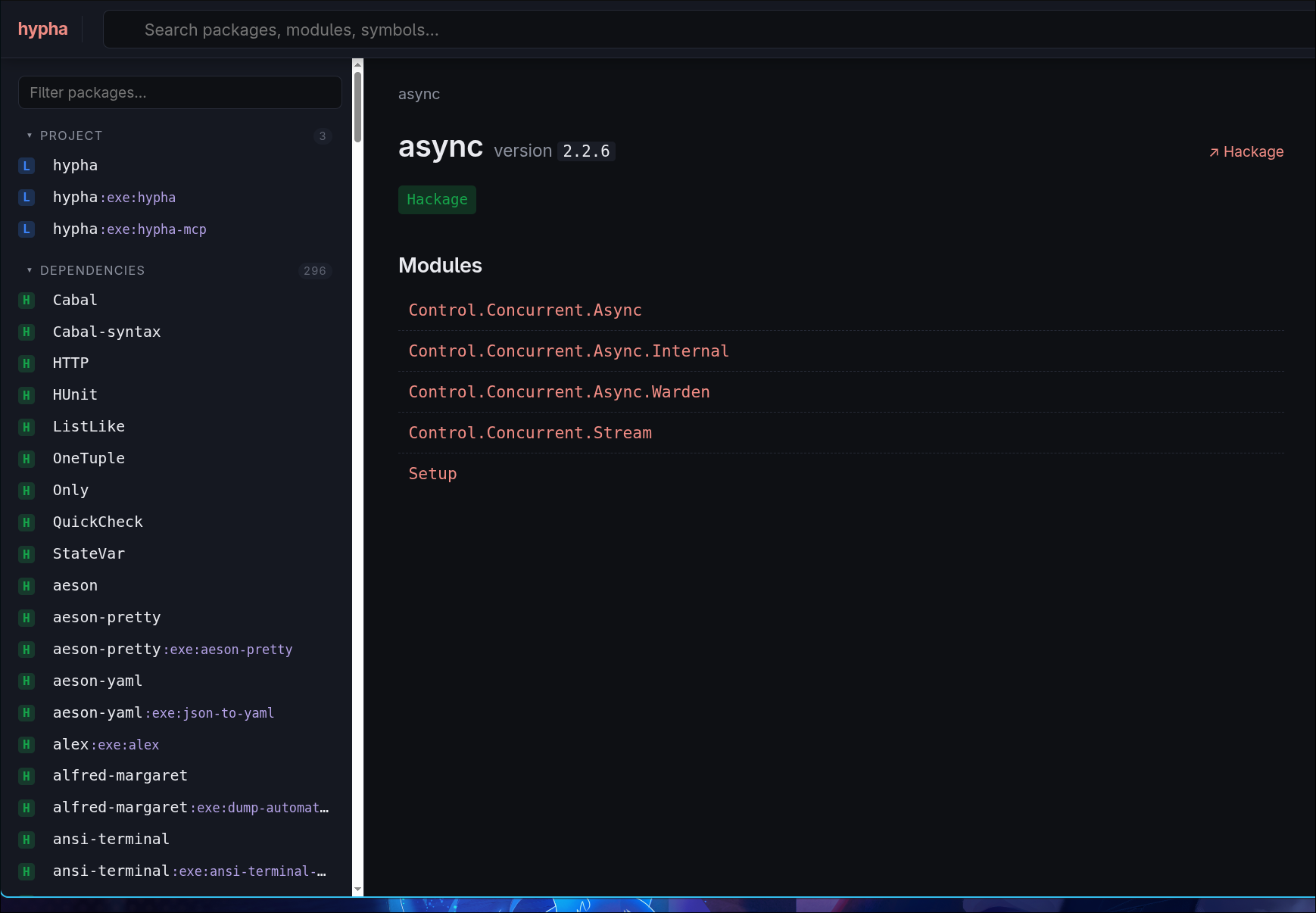
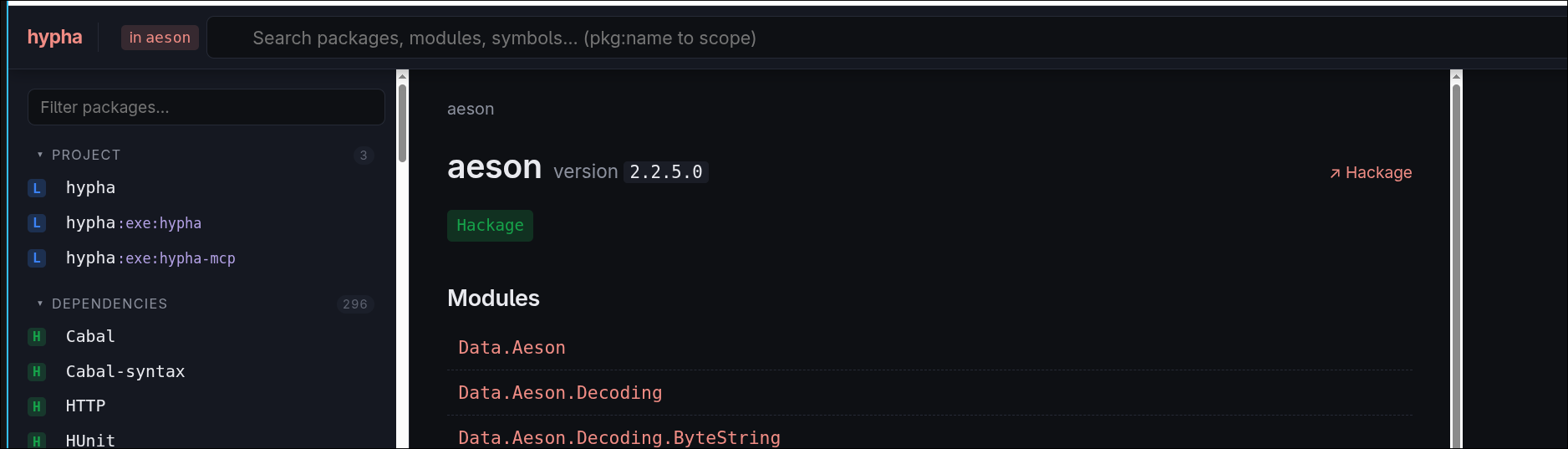
It’s also possible to restrict the search results in the bar to consider only the symbols within
a given package simply by pressing the small “in <pkg>” button next to the search bar. This is useful when multiple packages export heavily-overloaded
function names (e.g. lookup), and it will return in the dropdown menu only symbols for the given package:
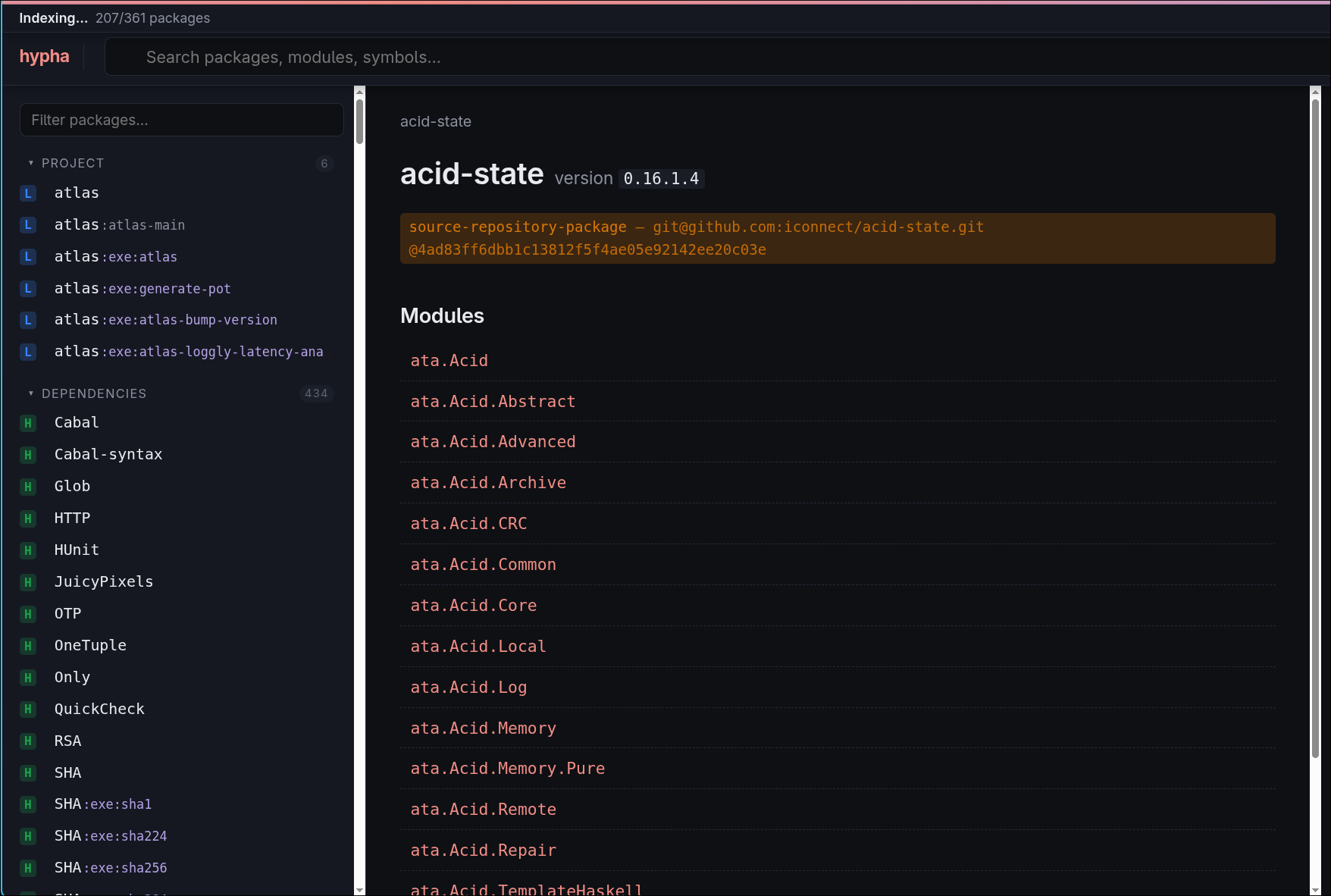
The plan-aware approach also covers dependencies that do not come from Hackage at all. If your project
pins a package via a source-repository-package stanza in its cabal.project, Hypha reads the
plan.json and learns exactly which git repository and which commit your dependency is pinned to. It
means that it’s possible to browse not-on-Hackage dependencies as well:

Last but not least, from a symbol you can jump straight to its definition. If you have already built
the Haddock documentation for a package (for example via documentation: True in your Cabal config),
Hypha will happily serve that. Otherwise, Hypha tries to cheat by rendering documentation from the source code on the fly,
to not pay the full price for building a huge tree of Haddock documentation offline; in that case the
rendering is not as pretty as Haddock, and the source view is not hyperlinked like on Hackage:
Alternative documentation browsers
A legitimate question is whether or not having a tool which implements interactive documentation browsing
is a useful addition to the ecosystem. Why can’t we just build the full Haddock documentation for
all our local packages and be done with it? Conversely, what are the advantages of using hypha server
compared to solutions like Flora?
Building offline Haddock documentation
The most obvious alternative to the Hypha server would be to build the offline Haddock documentation,
for example by setting documentation: True in your Cabal config.
That would certainly work and it’s a defensible approach; what you gain by using Hypha
is that if you already have the offline documentation, the Hypha server would happily serve it, and on top of
that you also get features like holistic search across all your transitive dependencies, whereas the typical
offline-Haddock approach would be to open the documentation of your root package and then drill down to the
individual dependencies by following the cross-package links in the type signatures. Even
cabal haddock-project, which gives you a nice landing page, only indexes your local packages
(tools like cabal-hoogle can get you a project-wide search, but at the price of a full documentation build).
Of course, if you haven’t built (or don’t want to build) the offline documentation then the Hypha server experience is somewhat less polished than the one you would get by using just Haddock; due to the fact that Hypha only parses the package sources but skips the rest of the compilation pipeline, TH splices won’t get evaluated and thus they are invisible to Hypha, and the source view is not hyperlinked like Haddock’s – if that means a lot to you, that is certainly an important difference to be aware of.
Flora
Flora is a great project that gives a powerful query system to search for a specific package;
however, to the best of my knowledge Flora piggybacks on Hackage itself for browsing the documentation.
Visiting a page like the one for containers shows
valuable information like dependencies, dependents, the versions etc, but clicking on “Documentation”
redirects to Hackage.
In a nutshell, I think every approach is valuable and defensible, and there is no silver bullet:
hypha server shines if all we want is to get started quickly by having holistic search of all our
project’s dependencies at the right versions and without having to compile anything, at the cost of
the quality of documentation in some cases. Using Haddock offline is what gives you the best accuracy
at the cost of a slightly less ergonomic experience for discovering functions by fuzzy searching from the
root of the package. Flora is great if you want to search for a particular project or build artifact
(like an executable), has a great API reference which
makes it suitable for being used programmatically and supports search modifiers
like depends: and exe: which Hackage doesn’t have.
Goals and related work
Before designing Hypha, I explored the solution space, and to my knowledge, these are the projects that existed last spring when I did my survey:
Both projects have their own merits, and I encourage you to look into them! I don’t like to comment on the design and implementation of other packages, as I think the only constructive stance for open source projects is to be grateful that somebody took the time out of their lives to contribute back to the community.
Rather than saying why I didn’t use one or the other, perhaps it would be more interesting to say what I wanted in the first place, and why I have decided to design Hypha. I wanted a tool which was:
- Capable of figuring out which packages and which versions my project was using just by inspecting the
plan.jsonavailable for each cabal project (at least after you runcabal build all --dry-run); - Offline-first: it should be possible to work offline on an airplane or in a coffee shop without an internet connection;
- Cache-friendly: we shouldn’t hammer Hackage or any other web service with AI harnesses more than it’s strictly necessary, i.e. we should take good care of our open source infrastructure;
- Implemented using the CLI Printing Press approach rather than as an MCP server;
- Useful for machines (i.e. non-interactive) but also humans (i.e. I could make sense of the output of the tool even if
hyphawere to be called standalone); - Helpful for interactively navigating documentation via a UI on top of what the CLI was already providing;
- A playground to experiment with AI-assisted development without being worried about violating any project’s ethos or contribution guidelines, or trying to shoehorn in features which projects might not want to support.
MCP vs CLIs
One of the most fundamental questions when building a piece of software which should be AI-first is to ask ourselves “How is the LLM going to consume it?” and, up until recently, the one and only answer was “exposed as an MCP server”. But what is exactly an MCP server?
MCP stands for Model Context Protocol
and, as the documentation states, is “an open-source standard for connecting AI applications to external systems”.
The super TL;DR is best explained with a concrete example. Suppose you want to connect your AI
to your Postgres database, for some data analysis: how do you “teach” the AI how to connect to Postgres,
how to query data, etc.? How do you do this remotely? By writing an MCP server you are essentially publishing
(some or all of) the atomic operations that this service supports behind an API. So you could imagine that (naively, disregarding any consideration about security, SQL injection etc.)
you could expose an operation like db_read(table, sql_query) which the AI could call and that your
MCP server could implement however it wants. Now, the next time you ask the AI to query some data, internally
the harness would make a request to the registered MCP server, calling the API corresponding to the db_read
operation, and giving you back the result.
The advantage of using MCP is clear:
- It’s an open source standard, so it’s something that most harnesses and LLM websites support;
- It can be hosted anywhere and exposed remotely, so you can connect your favourite service and access the MCP server from within a web chat, for example.
The disadvantage of using an MCP server is that you have to build it in the first place, obviously, but you also pay a roundtrip price as the information has to travel back and forth using JSON-RPC 2.0, and it produces verbose results, so it is not immediately the most context/token friendly option if you really care about those things.
In the past few months, a new trend emerged: just use a CLI!
If you think about it, it makes sense: LLMs have been trained on a ton of Bash code, so they know very well
how to write Bash scripts and how to call Unix tools. In the example above, we could have a little CLI wrapping
our blessed operations and just ask an AI harness to use it (for example: echo <my_sql_query> | my-cli db_read <table> -).
This is obviously a very local-centric solution (we cannot natively “publish” the CLI) and is not standard
(i.e. AIs wouldn’t know how to connect to your CLI natively). However, we can easily wrap our CLI in an MCP server, to get the best of both worlds: locally our AI harness
can call the CLI directly, without paying the token cost for full JSON, but we can still get the benefit
of the MCP server when it matters. This is the approach taken by the wonderful
CLI Printing Press project, which gives you the
ability to produce a CLI wrapping many public-facing services, including an MCP server and a cache
to make things more efficient.
This is the route I went for Hypha as well; not using CLI Printing Press directly, but borrowing from
its manifesto. The Hypha repository ships a hypha CLI, a hypha-mcp binary, and a Claude plugin that
teaches Claude to query them.
Conclusion
We have covered the basics, and if you are still interested the Hypha documentation site has everything you need to get started. I hope I have made a convincing case on why Hypha might be useful, despite it having been mostly coded via an LLM. Even though it’s beta and there are still bugs to be fixed (and many more to be discovered) I have found it useful on more than one occasion, especially as a documentation browser. Please get in touch if you have any feedback and consider filing an issue for anything that you think should work but doesn’t!
For the entirety of this section I’m using
asyncand themapConcurrentlyBoundedfunction it exposes as an example to discuss the problems highlighted below, but the narrative generalizes to any Haskell package.↩︎